Google Business Profile Video Verification Failing? What to Check
Find where Google Business Profile video verification is failing, prepare the right evidence, and choose the next step for your service business.
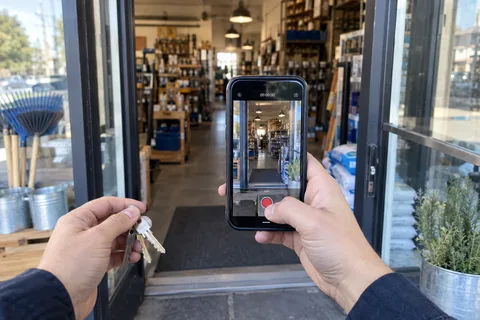
If your Google Business Profile video verification keeps failing, first identify whether the problem is recording, uploading, review, or business eligibility. Then fix that specific problem. A rejected video and a camera that never starts need different next steps.
For a plumber, electrician, or mobile repair business, a home base doesn't automatically mean you need a public storefront. The evidence should match how your business actually operates.
Find the failure before recording again
Write down the exact message shown in your profile. Avoid reducing every message to “Google rejected me.” Use this worksheet to decide what to investigate.
| What you see | What to establish | Next action |
|---|---|---|
| Recorder stays at 0:00 | Did recording ever start? | Check the requested camera, microphone, and location permissions; note the device and browser. |
| Recording finishes, upload fails | Did Google receive a submission? | Retry the upload through the profile and save the exact error if it fails again. |
| Video is pending | Has the stated review period elapsed? | Record the submission date before starting another attempt. |
| Video is rejected | Which evidence was missing? | Read the rejection details and change the missing part of the evidence. |
| Profile says suspended | Is this a suspension rather than verification? | Follow the suspension route shown in the account. A new video alone may not resolve it. |
This is a diagnostic worksheet, not a list of confirmed causes for your account. If changing devices helps a recording problem, that still doesn't tell you why an earlier completed video was rejected.
Google requires a live, unedited mobile recording through the profile, lasting at least 30 seconds. Review can take up to five business days. After a rejection, use Review issues to see what needs correcting. Read the official video verification instructions before submitting.
Does your profile match the real business?
A contractor who travels to customers is different from a hardware store that welcomes customers at a staffed shop. Choose the setup that describes reality.
Google says service-area businesses should hide their business address from customers. A virtual mailing office isn't a substitute for an actual operating location. Its business representation guidelines explain the rules for addresses, signage, and separate staffed locations.
Before filming, compare the business name and operating details on the profile, website, and real business materials. If those tell conflicting stories, list the discrepancies. Correct inaccurate information deliberately, keeping a record of what you changed.
For example, a residential address used to administer a plumbing business should not be presented as a customer showroom just because a tutorial shows a storefront sign. Buying a temporary sign to imitate another business type creates a different problem from the one you were trying to solve.
Book a free 20-minute call to identify what needs attention in your business profile and website.
Plan evidence that connects the place, work, and operator
Use three columns on a piece of paper: location, business activity, and authority to operate. Under each, write what a reviewer will actually see. “My business is real” is a conclusion; the footage needs observable evidence.
For a real service-area plumbing business, the plan might look like this:
| Evidence question | Example you could prepare | Check before recording |
|---|---|---|
| Where does this business operate? | Identifiable surroundings at its real base | The location is understandable without guessing. |
| Does it perform this work? | The professional equipment used on jobs | The footage shows business activity, rather than an unrelated room. |
| Can the operator demonstrate control? | Access to a business vehicle or appropriate business documentation | The evidence connects the operator with the same business. |
These examples adapt Google's requirements to a contractor's workflow. They aren't a required shot list or a guaranteed approval formula. Keep private identifiers and other people's faces out of the recording, as Google's instructions require.
Rehearse the route without recording customer information. Check lighting and legibility. Decide where you will begin and end so you can show the evidence in one continuous recording. A longer video isn't automatically stronger; every part should answer an evidence question.
What to do when the next attempt still fails
Create a short case note with the profile URL, exact message, submission dates, device, and changes between attempts. This turns “I've tried everything” into a sequence someone can investigate.
Don't create another listing to escape the first listing's problem. Keep the case attached to the real business and the existing profile.
Google determines which verification methods are available. You can't select postcard or phone verification just because someone else received that option. Try the options actually shown, then use the support route in Google's verification guidance if you remain unable to verify.
Once verification succeeds, treat visibility as a separate job. Our Google Maps ranking diagnostic explains what to check when an active profile still fails to appear for relevant services.
Common verification questions
Can a business without a storefront be verified?
A business that genuinely visits customers may qualify as a service-area business. Check its operating setup against Google's eligibility guidance. Registering a company alone doesn't establish that every business model qualifies.
Does another rejection mean the business is permanently blocked?
A rejection identifies a failed verification attempt. Read the actual account message before drawing a broader conclusion, especially if the profile is also suspended or showing an ownership issue.
What should I change before the next video?
Start with the stated missing evidence, then check that the whole submission still meets the requirements. Keep a simple attempt log so each revision has a reason.
Your next step: save the current account message and identify the failure stage before starting another attempt.
Research note: eight independent askers raised verification difficulties in our August 14–September 12, 2026 convenience sample. Nine posts included one repeated asker. These are observed questions, not a measured rejection rate. See the sample methodology and source dataset.